FitHive Updates: March 2026
Mar 16, 2026
by Donny M.
This post covers the newest round of FitHive updates and new features for March 2026.
NEW FEATURES/UPDATES
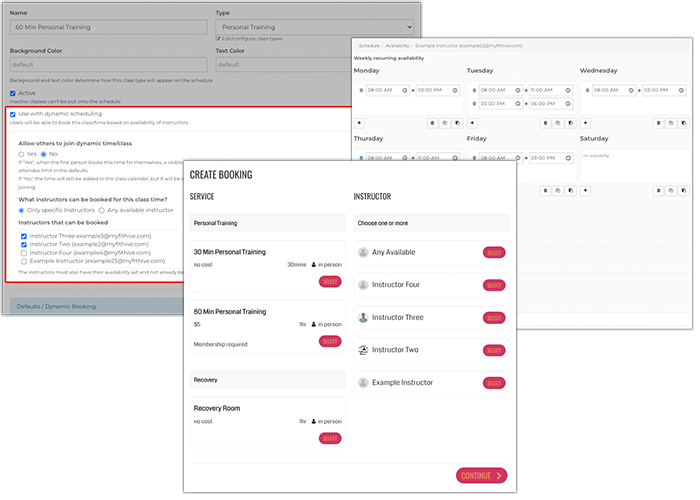
Dynamic Scheduling
This new feature allows you to set up daily instructor availability so users can book sessions/classes/services with them. Dynamic scheduling automatically updates available booking times based on real-time instructor availability, services offered, and customizable rules set by you. This reduces conflicts, prevents overbooking, and simplifies scheduling for your team while providing flexible booking options to your members. For example, a gym owner can allow members to either book directly with a specific trainer or have the system automatically assign an available coach based on availability. Please make sure to check out the new Dynamic Scheduling support article for complete directions on how to set this up.
Webpage Editing History
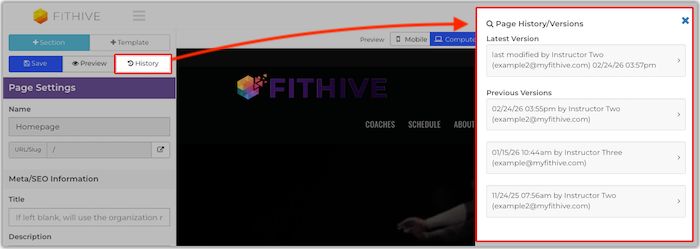
We've added a new feature within the web page editor that saves any edit made to a page. This also gives you the option to restore a page to a previous version of it as needed, as well as the ability to pick back up on a session that was accidentally closed prior to saving (if your computer/browser crashes, browser tab closed by mistake, etc). Additionally, deleted pages will be stored and accessible through the "Deleted Pages" link located at the top of the web pages list (Website >> Manage Web Pages). Please review the updated How to Create/Edit Web Pages support article for full details.
One Pass Left Automation (Updated)
We've added a new "user_email" token to the Only 1 Pass Left Membership Notice for members and admins. When used, this token will automatically populate the user's (member's) email address into the notification that is sent out to the member and/or admin once their membership is down to its last pass. If needed, please review the Automations Overview support article to familiarize yourself with the automations available in your Hive.
Membership Revenue Report (Updated)
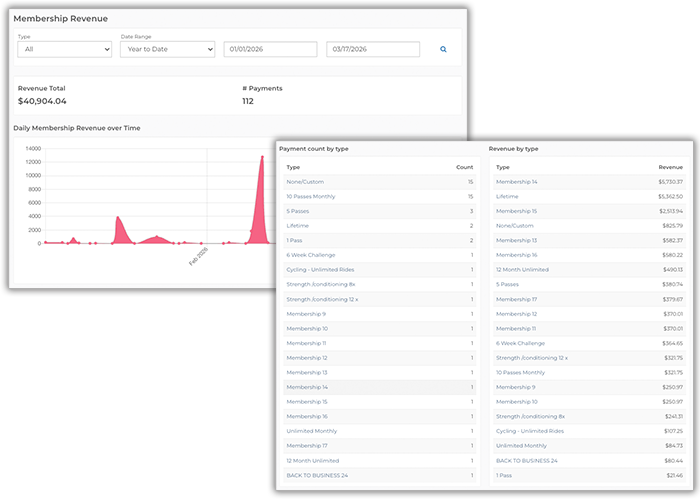
Prior to this update, the Payment Count by Type and Revenue by Type portions of the Membership Revenue Report only displayed the top 20 membership types, but we've updated these to display data for all active membership types. Additional pagination (pages) will be added to the bottom of this section if you have more than 20 active membership types.
Quick Checkin on Tablet App
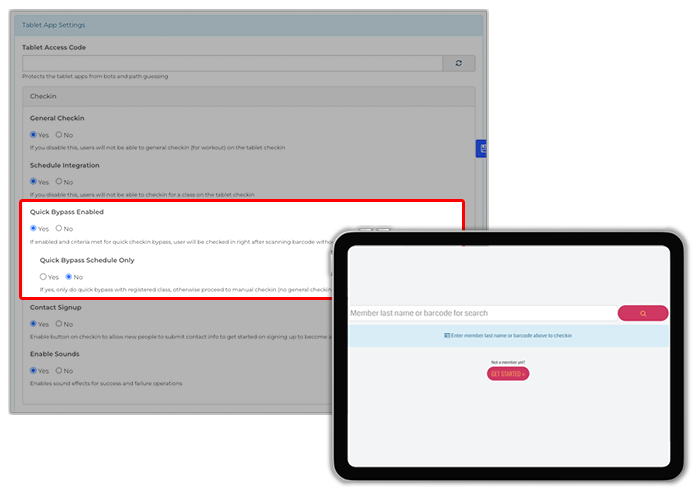
This new setting, if enabled, gives you the option to set up the Checkin section of your tablet app for members to scan their barcode and be automatically checked into a class, or general checkin without further verification, which can significantly reduce the amount of time your members spend checking in. Please note for class checkins, that the start of the class must be within 30 min (prior or past) from the time the member is attempting to checkin, otherwise the system will treat it as a general checkin (pending on your tablet app configuration). Additionally, quick checkins can only be used by scanning in the members' barcode ID. Please checkout the updated How to Set Up a Tablet for Class/Gym Checkins for more details.
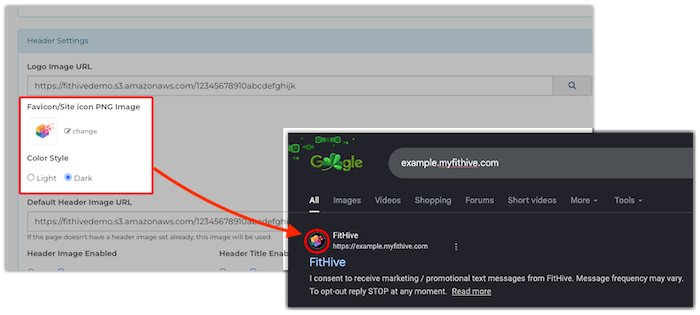
Website Favicon (Generation and Handling Update)
Since some tech companies prefer to make things difficult with how they display website favicons (we won't name anyone, but they rhyme with "Shmoogle"), we've made an update to the servers and your Hive settings that will auto-configure the image set as your website favicon so that it's displayed correctly in online search results. As long as the image set as your website favicon is a JPEG or PNG it should have been automatically reconfigured once this update was pushed live, but if you'd like to update/re-add it you can do so from your admin dashboard by going to Settings >> General Settings >> scroll down to the Header Settings section and upload your preferred image through the Favicon/Site Icon PNG Image URL field >> Save the changes and you're all set. Please note that in can take up to a few days for the favicon to update in some search engines depending on how often your site is crawled, so you might not see this updated right away.
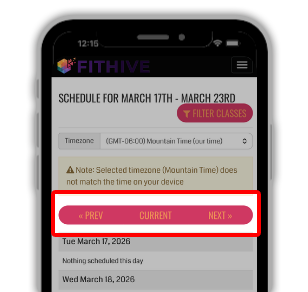
Frontend Class Schedule (Updated for Mobile)
We received feedback that the text for "Previous Week", "Current Week", and "Next Week" was extending beyond the edges of their buttons on the class schedule depending on the default fonts set for your Hive/website. This update addresses that issue by auto-adjusting the displayed text to "Prev", "Current", and "Next" when your schedule is being viewed on mobile.
Icon Content Widget (Updated)
We've added 6 new editing options to the Icon Content Widget (<< click for more details) in the web page editor. These new options are:
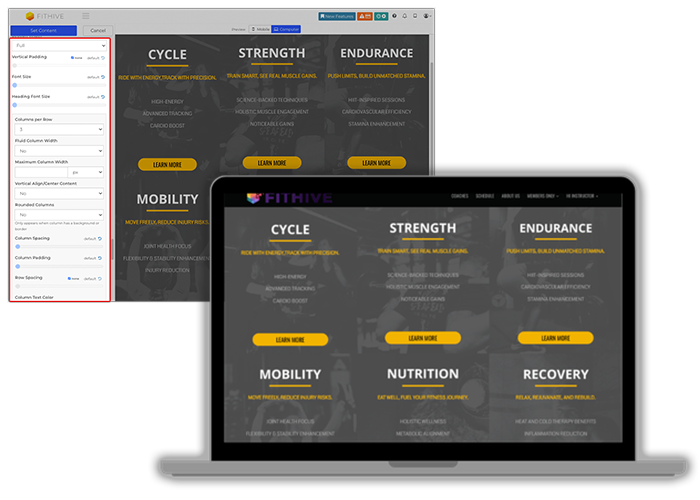
- Column Borders: option to add a border around each content column, along with setting the color and thickness of the border as desired
- Section Width: new options to set the section width to Page or Full; Page Width will leave vertical padding on the sides of the section, whereas Full Width will completely remove any padding so that the content within the section touches both left/right edges of the screen
- Vertical Padding: this setting has been updated with a "None" option, which will completely remove vertical padding at the top/bottom of the section
- Row Spacing: similar to vertical padding, we've added a "None" option to the Row Spacing setting that will completely remove all spacing in between the content columns
- Image Positioning: identical to the existing Icon Position, this new setting allows you to position an image to the Top, Left Content, Left Content Top, and With Content - Top
- New Icon/Image Position: "With Content - Top" is a new option within the Icon Position and Image Position settings that will put the element (icon or image) with the content, so that if the content is centered the image/icon is will be centered at the top as well; if content is left aligned then the image/icon will left aligned at the top of the content as well
Member App Design Options
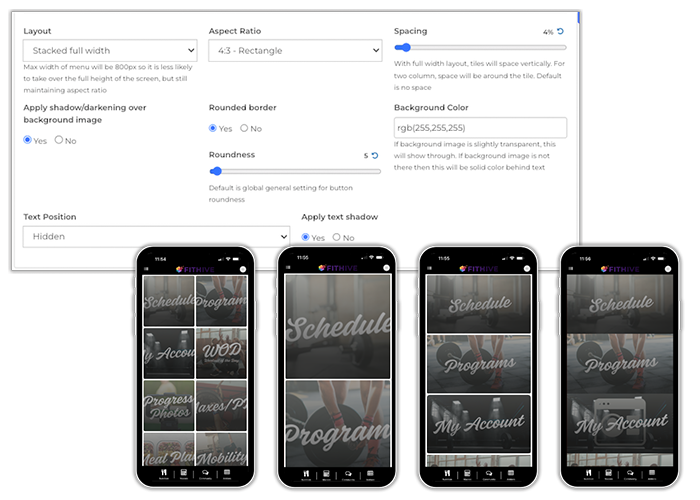
This update added tons of new editing options to customize your member app dashboard, such as split columns for the widgets, borders, spacing, shadowing and more. Please reivew the Dashboard Menu section of the updated Member App support article for more details.
We truly appreciate your continued feedback/suggestions as we continue to improve our platform and have tons of new features/updates planned. If you have any feature requests of your own, please feel free to submit them in the Feature Request portal. You can also reach out to success@myfithive.com if you have additional questions on any of the new updates or features. As always, thanks for being a part of the FitHive Family!